Updated: HubSpot Credits have changed across several AI and data features. This guide has been refreshed with the latest credit amounts for Customer Agent, Prospecting Agent, Data Agent, Breeze workflow actions, Buyer Intent and Data Studio, with practical notes to help admins understand and manage usage.
HubSpot Credits are now an important part of how teams use AI, automation and data tools across the HubSpot Customer Platform. They act as monthly usage allowances for selected features, including Breeze Agents, Breeze workflow actions, Buyer Intent, and Data Studio.
This guide explains how HubSpot Credits work, which features use them, how much different actions cost, and how admins can monitor usage before it affects their team’s workflows or budget.
We previously covered the introduction of HubSpot Credits in our earlier HubSpot Credits guide. This article builds on that foundation, covering the latest credit changes and a more practical breakdown for teams planning their AI and automation use.
For HubSpot admins, the key takeaway is simple: credits should be managed like any other operational limit. Before rolling out AI agents, workflow actions or large-scale data features, it is worth understanding which tools consume credits and how quickly usage can grow.
A Quick Recap: What HubSpot Credits Are
HubSpot Credits are a monthly usage allowance for selected AI, automation and data features inside HubSpot.
They are used when certain tools perform an action for you, such as resolving a conversation, recommending outreach, running a Breeze action in a workflow, generating a response for a record, or using a Data Studio dataset in an operational process.
In practical terms, credits help HubSpot measure usage for features that can scale quickly, especially AI-powered and data-heavy tools.
Key points to remember:
- Credits reset monthly.
- Unused credits do not roll over.
- Credits are shared across eligible features.
- Included credits are based on your highest eligible subscription tier.
- Additional credits can be added through capacity packs or pay-as-you-go.
- Admins should monitor usage regularly, especially when testing AI or automation at scale.
→ What Are HubSpot Credits? A Simple Guide for Users.
Which HubSpot Features Now Use Credits?
The current credit-consuming features are grouped across Breeze Agents, Breeze Automation, Buyer Intent and Data Studio.
Some tools use credits every time an action happens. Others may consume credits on a recurring basis, especially when monitoring or ongoing automation is enabled. This is why it is important to consider both the credit amount and the expected usage volume.
Important: Use this section as a planning guide. HubSpot may update credit rates, and beta features may begin consuming credits as they evolve.
Below is the updated breakdown by product area.
1. Breeze Agents
| Feature | Action | Credits |
| Data Agent | Generate a response to one prompt for one record | 10 credits |
| Customer Agent | Resolves one conversation through text-based channels | 50 credits |
| Prospecting Agent | Recommended outreach for 1 lead | 100 credits |
What changed?
The most important change is the Customer Agent credit amount. Customer Agent is now listed at 50 credits per resolved text-based conversation, rather than the previous 100-credit figure.
Prospecting Agent has also been simplified in the current rate sheet. Instead of separating usage into monitoring and company research actions, it is now listed as 100 credits to recommend outreach for one lead.
For service teams, Customer Agent usage should be reviewed against expected conversation volume.
For sales teams, Prospecting Agent usage should be reviewed against lead volume. If your team plans to use Prospecting Agent at scale, estimate how many leads it may support each month before enabling broader usage.
2. Breeze Automation
| Feature | Action | Credits |
| Breeze workflow action | Execute one AI action | 10 credits per action |
This includes actions such as inferring ICP, identifying buyer needs, summarising data, and other AI-driven workflow steps.
Workflow usage needs to be planned around volume. A single Breeze action may only use 10 credits, but if that action runs across hundreds or thousands of enrolled records, credit usage can increase quickly.
This is especially important when Breeze actions are used for data management, classification, enrichment, summarisation or routing. If your workflow uses Data Agent specifically, review the Data Agent section below for a more detailed breakdown of how those actions can appear in smart properties, workflow actions, smart columns and custom prompts.
3. Buyer Intent
| Feature | Action | Credits |
| Intent Signals | Enable intent signals to create a company and/or monitor a company for one month | 10 credits |
4. Prospecting Agent: Credit Usage Overview
| Feature | Action | Credits |
| Prospecting agent | recommending outreacy for one lead | 100 credits |
For sales teams, this makes lead volume the main planning factor. A small number of high-value recommendations may be easily managed within the included monthly allowance. A larger outbound motion, however, should be planned more carefully.
Before enabling Prospecting Agent broadly, review:
- How many leads the team expects to process each month
- Whether usage will be limited to specific reps or segments
Whether the feature is being tested manually or embedded into a repeatable process - How the team will monitor usage during the first month
5. Data Studio
Data Studio credit usage depends on how the dataset is used and the size of the primary source.
The important distinction is that operational use can consume credits, while reporting use does not.
| Feature | Action | Credits |
| Data Studio | Use a dataset in a workflow, segment, CRM sync or export where the primary source has fewer than 500k rows | 25 credits |
| Data Studio | Use a dataset in a workflow, segment, CRM sync or export where the primary source has 500k to 5 million rows | 75 credits |
| Data Studio | Use a dataset in a workflow, segment, CRM sync or export where the primary source has more than 5 million rows | 200 credits |
Using a dataset in a report does not consume credits.
For RevOps and data teams, this distinction matters.
Using datasets for reporting is different from using datasets to power workflows, segments, CRM syncs or exports. If a dataset is part of an operational process, especially one running regularly or across a large data source, it should be reviewed as part of monthly credit planning.
6. Data Agent
Data Agent is part of HubSpot’s AI-powered data management layer. It helps teams research, analyse, transform and populate CRM data using prompts, record context and selected data sources.
In practice, Data Agent can appear in several places across HubSpot, including:
- Smart properties, where Breeze fills a property based on a defined prompt and data source.
- Workflow actions, where Data Agent can analyse, summarise, categorise or research enrolled records.
- Smart columns in Data Studio, where AI can research or analyse data and add generated columns to a dataset.
- Custom prompts, where teams can ask Data Agent to generate a response based on CRM record data.
| Feature | Action | Credits |
| Data Agent | Generate a response to one prompt for one record | 10 credits |
Smart properties
Smart properties allow teams to create AI-filled properties for contacts, companies, deals, tickets or custom objects. Each smart property is based on a defined prompt and data source, such as a company domain, another CRM property, a call transcript or a file property.
This is useful when a team needs structured information directly on the record, rather than leaving AI-generated insight in notes, summaries or external documents.
For instance, a company's smart property could review a company website or an uploaded PDF and populate fields such as Target Market Fit, Primary Use Case, or ICP Segment.
Smart properties use Breeze to populate CRM fields from defined data sources and are separate from default contact and company enrichment.
Workflow actions
Data Agent can also be used in workflows. This is where credit planning becomes more important, because workflow actions can run across many enrolled records.
Common workflow use cases include:
- Analysing a record and generating a structured output
- Summarising CRM information
- Categorising records into segments
- Researching companies
- Filling smart properties automatically
- Using the AI output in a later workflow step, such as a branch or record update
For example, a workflow could ask Data Agent to review enrolled companies, classify them by ICP fit, and then use the output to route records into different nurture, sales or review paths.
Data Agent workflow actions include custom prompt, research and fill smart property actions. The outputs can then be used by other workflow actions, including branches or record updates.
Smart columns in Data Studio
Data Agent can also support Smart Columns in Data Studio. Smart Columns use AI to research and analyse data, then add generated columns to a dataset.
This is useful when teams want to enrich or transform data before using it in segmentation, workflows, syncs or exports.
As an example, a Smart Column could classify companies by industry fit, summarise a text field, or generate a standardised category from messy source data.
Smart Columns use AI to research and analyse data and add dataset columns in Data Studio.
Custom prompts
Custom prompts are useful when the team needs more control over the AI instruction. Instead of relying only on a predefined action, admins can define the specific prompt, expected output and CRM context the action should use.
This is useful for more tailored RevOps processes, such as:
- classifying companies using your own ICP criteria
- summarising sales notes into a standard format
- extracting key information from unstructured fields
- generating a recommended next action
- turning messy CRM text into structured property values
Data Agent is not just one isolated AI tool. It can sit inside properties, workflows, datasets and custom prompt-based processes.
The credit amount may look small at 10 credits per prompt response for one record, but the total usage depends on scale. A manual prompt for a few records is low risk. A workflow or smart property process running across hundreds or thousands of records should be planned more carefully.
Before scaling the Data Agent, admins should review:
- Which records the action will run on
- Whether the process is manual, recurring or workflow-based
- Whether the output is being written to CRM properties
- Whether the same result could be achieved with a standard workflow action instead
- How the action will be monitored during the first month
7. Breeze AI Features, Assistants and Future Credit Usage
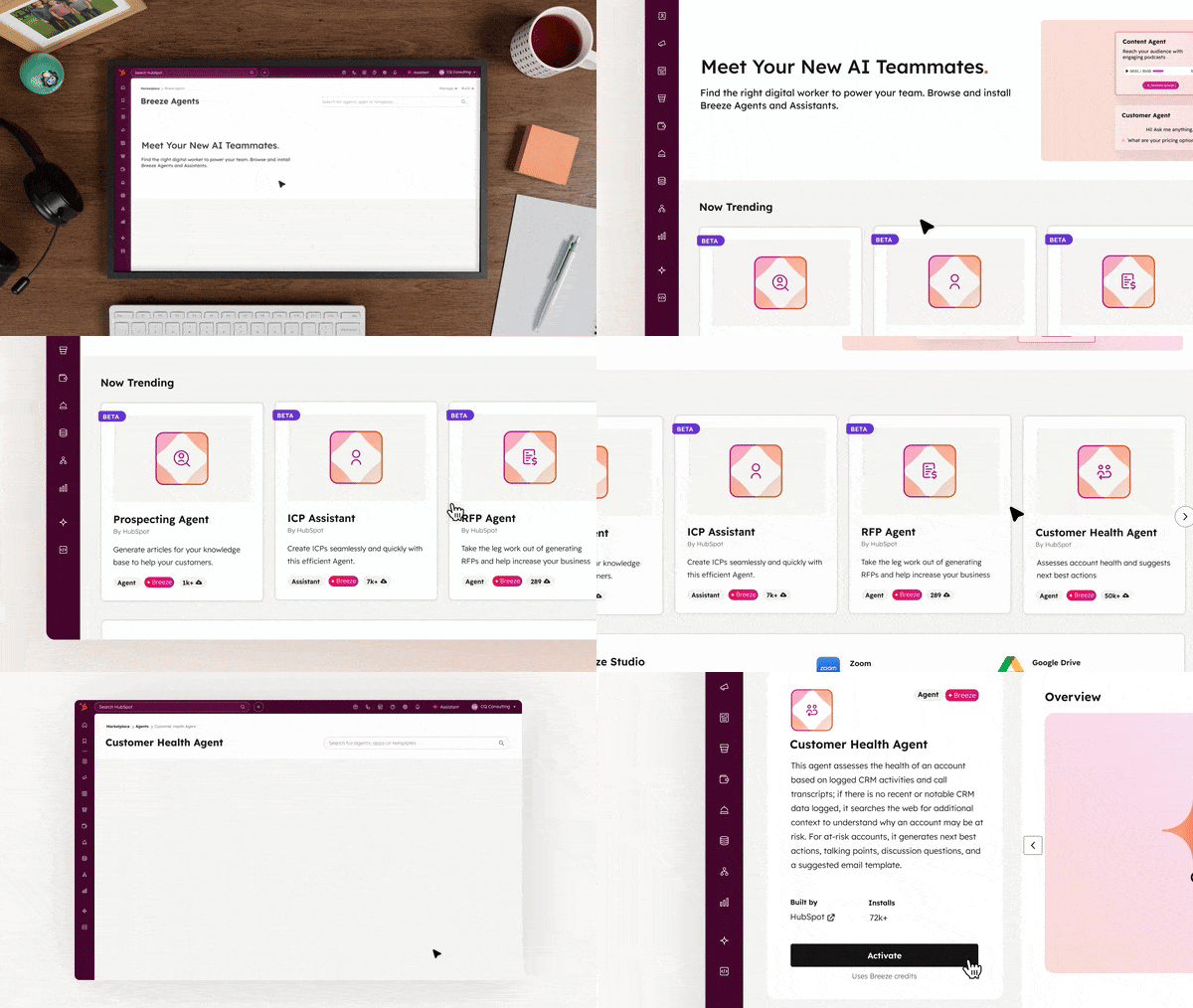
Breeze is HubSpot’s AI layer across the Customer Platform. It includes AI-powered assistants, agents, workflow actions, and data tools that help teams research, summarise, classify, enrich, and automate work in HubSpot.
There are two useful distinctions for admins:
- Breeze Assistants help users complete tasks faster inside HubSpot, such as writing, summarising, researching or generating content.
- Breeze Agents are designed to complete more outcome-based work, such as supporting customer conversations, prospecting, data tasks or internal handoffs.
 Source: HubSpot
Teams can also use Breeze Studio to create and configure AI assistants and agents around more specific business needs. This is where AI starts to move beyond one-off prompts and becomes part of repeatable processes inside the portal.
Some Breeze Studio agents and AI assistants may not currently consume credits, depending on their status and how they are used. However, this can change as features move from beta into wider release or become connected to higher-volume processes.
When testing or rolling out Breeze features:
- Start with a limited use case
- Avoid adding new AI actions directly into high-volume workflows without testing
- Monitor usage during the first month
- Review whether the feature creates enough value to justify the credit usage
- Keep a simple record of which assistants, agents or workflow actions are being tested
If your team is exploring Breeze in more depth, we also covered practical examples of how businesses can get real value from HubSpot AI in our Dublin HUG webinar: Getting Real Value from Breeze AI.
This is especially important for teams using Breeze across service conversations, sales prospecting, workflow automation and data management, where AI usage can move from occasional to recurring very quickly.
How to Identify Credit-Based Tools Inside Your HubSpot Portal
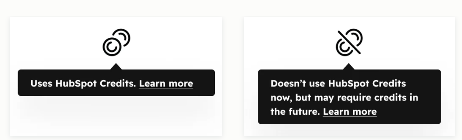 Source: HubSpot
You can also review usage from Account & Billing > Usage & Limits > HubSpot Credits.
This area helps admins understand:
- How many credits are included in the account
- How many credits have been used this month
- Which features are consuming credits
- How usage has changed over time
- Which specific actions are contributing to usage
This is the section admins should check regularly when testing or scaling Breeze Agents, Breeze workflow actions, Buyer Intent or Data Studio.
Included HubSpot Credits by Subscription Tier
HubSpot Credits are included with many paid subscriptions, but the number of credits depends on the product and subscription tier.
The important point is that credits are not added together across every HubSpot product in the account. Instead, the account receives the highest available credit allocation based on the highest eligible subscription level.
Smart CRM, Marketing Hub, Sales Hub, Service Hub or Content Hub
|
Subscription Tier
|
Monthly Included Credits
|
|
Starter
|
500
|
|
Professional
|
3,000
|
|
Enterprise
|
5,000
|
Data Hub & Customer Platform
If your subscription includes Data Hub or the Customer Platform, your monthly credits increase:
|
Subscription Tier
|
Monthly Included Credits
|
|
Starter
|
500
|
|
Professional
|
5,000
|
|
Enterprise
|
10,000
|
Customer Platform refers to the bundled edition of HubSpot’s products at Starter, Professional or Enterprise level.
Teams with Data Hub or Customer Platform may have a higher monthly credit allowance than teams using an individual Hub. However, usage can still grow quickly if AI agents, workflow actions, intent monitoring or Data Studio operations are used at scale.
Managing Additional Credits
If your team needs more credits than the monthly allowance, there are two main ways to increase capacity: capacity packs and pay-as-you-go.
1. Capacity Packs
Capacity packs increase the account’s monthly credit limit for the remainder of the commitment term.
| Additional Credits | Price |
| 1,000 additional credits per month | $10 USD |
If you exceed your included credits, HubSpot automatically adds capacity packs unless you choose to pay for overages or set a credit cap.
Capacity packs are useful when credit usage is expected to remain consistently higher each month.
2. Pay-As-You-Go
Pay-as-you-go is better suited for temporary or variable usage. Instead of increasing the monthly limit for the rest of the commitment term, the account is charged for additional credits used in the current month.
| Additional Credits | Price |
| Pay-as-you-go credits | $0.010 per credit, invoiced in increments of 10 credits |
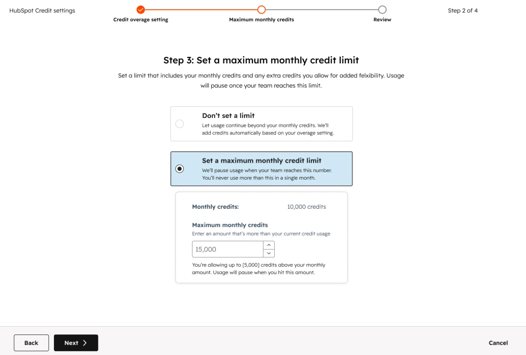
3. Credit Limit Setting (Credit Caps)
- Breeze actions in workflows pause
- Buyer Intent monitoring pauses
- Prospecting Agent research pauses
- Data Agent/Data Studio actions pause
- No automatic upgrades occur (unless you explicitly enable them)
- Set a monthly ceiling on usage
- Decide whether overages are allowed
- Choose whether additional capacity packs can be added automatically
- This control lets teams experiment with AI features without worrying about runaway usage or accidental spending.
 Source: HubSpot
Capacity packs are better for predictable ongoing usage. Pay-as-you-go is better for temporary overages or testing periods. Credit limits are important when experimenting with features that could scale quickly.
4. Usage Notifications
Admins should not wait until credits run out to check usage. HubSpot provides notifications as the account approaches its credit limit.
|
Usage Threshold
|
Notifications Sent to
|
What it Means
|
|
75%
|
Billing Contacts + Super Admins
|
The account has used most of its monthly credits
|
|
85%
|
Billing Contacts + Super Admins
|
Usage is approaching the monthly limit
|
|
90%
|
Billing Contacts + Super Admins
|
The account is close to exhausting the monthly allowance
|
|
Limit Exceeded
|
Billing Contacts + Super Admins
|
Additional settings, overages or feature pauses may apply depending on the account setup
|
These notifications should trigger an internal review. If usage is higher than expected, check whether the increase is coming from AI agents, workflows, Buyer Intent, Data Studio or another credit-consuming feature.
Need help reviewing your HubSpot Credits usage?
If your team is starting to use Breeze, Customer Agent, Prospecting Agent, Buyer Intent, Data Studio or AI-powered workflows, it is worth reviewing your usage before scaling further.
Cat Media can help you understand which features may consume credits, where usage could increase, and how to plan a controlled rollout across your HubSpot portal.

Common Questions
Do HubSpot Credits roll over?
No. HubSpot Credits reset monthly, and unused credits do not roll over into the next month.
Are credits added together if we have multiple HubSpot products?
No. Credits are not stacked across every product in the account. The account receives the highest available credit allowance based on the highest eligible subscription level.
How much do additional HubSpot Credits cost?
Capacity packs are currently priced at $10 USD per additional 1,000 credits per month. Pay-as-you-go is currently priced at $0.010 per credit, invoiced in increments of 10 credits.
Which HubSpot features use credits?
The main credit-consuming areas covered in this guide are Breeze Agents, Breeze workflow actions, Buyer Intent and Data Studio.
Does Customer Agent use HubSpot Credits?
Yes. Customer Agent currently uses 50 credits to resolve one conversation through text-based channels.
Does Prospecting Agent use HubSpot Credits?
Yes. Prospecting Agent currently uses 100 credits to recommend outreach for one lead.
Does Data Studio reporting use credits?
No. Using a dataset in a report does not consume credits. Using a dataset in a workflow, segment, CRM sync or export can consume credits depending on the size of the primary source.
How can admins monitor HubSpot Credits usage?
Admins can review usage under Account & Billing > Usage & Limits > HubSpot Credits. This area shows monthly allocation, current usage, feature-level usage, historical usage and usage logs.
Final Thoughts
HubSpot Credits are becoming an important part of how teams plan AI, automation and data operations inside HubSpot.
The goal is not to avoid credit-consuming features. Many of these tools can save time, improve customer experience and help teams act faster. The goal is to understand how credits are used before rolling features out at scale.
For admins, the most important areas to monitor are:
- Customer Agent conversation volume
- Prospecting Agent lead volume
- Breeze actions inside workflows
- Buyer Intent monitoring
- Data Studio usage in workflows, segments, CRM syncs and exports
If your team is using or planning to use these tools, reviewing your credit usage regularly will help you avoid unexpected limits and make better decisions about AI adoption inside HubSpot.
Cat Media can support your team with HubSpot Credits planning, AI feature rollout, workflow review and RevOps strategy, so your portal can scale without unnecessary complexity.