HubSpot has renamed Commerce Hub to Revenue Hub.
At first, this may sound like a simple product rebrand. The more useful way to understand it is as a shift in how HubSpot supports the revenue process after a buyer is ready to move forward.
Revenue Hub brings CPQ, contracts, billing and payments into one workflow inside HubSpot. It helps teams manage the journey from quote creation through to contract, invoice, payment and renewal, using the same customer data already held in the CRM.
For HubSpot customers, the key change is context.
Your CRM already shows who the customer is, what they engaged with, which conversations have happened and what opportunities are in progress. Revenue Hub adds the commercial layer: what was quoted, what was accepted, what is under contract, what needs to be billed, what has been paid and what is due to renew.
That gives sales, RevOps, finance, customer success and AI agents a clearer view of the customer relationship.
What is Revenue Hub?
Revenue Hub is HubSpot’s quote-to-cash platform. It helps businesses manage the commercial steps that happen between a sales opportunity and collected revenue.
Source: HubSpot
In plain terms, it helps teams answer questions such as:
-
What did we sell?
-
Which price and terms were agreed?
-
Has the customer accepted the quote?
-
Which contract is now active?
-
What needs to be invoiced?
-
Has the customer paid?
-
What is changing mid-contract?
-
When is the renewal due?
-
How does this revenue connect back to the customer record?
This makes Revenue Hub especially relevant for businesses where quoting, billing and renewals involve more than one team.
Sales may own the opportunity. RevOps may own pricing rules and approvals. Finance may own billing and payment reconciliation. Customer success may own renewals and post-sale changes. Leadership needs reporting across the full process.
Revenue Hub gives those teams a shared structure for managing revenue inside HubSpot.
Why the name changed from Commerce Hub to Revenue Hub
Commerce Hub focused attention on payments, invoices and commerce workflows.
Revenue Hub gives a wider description of the process HubSpot now supports. Revenue includes how a business prices, quotes, approves, contracts, bills, collects, renews and reports.
This distinction matters because many revenue problems come from operational gaps rather than lack of demand.
A buyer may be ready to sign, but the quote still needs approval. A deal may be closed-won, but finance still needs to recreate the invoice. A customer may be due for renewal, but the contract terms may sit in a PDF or spreadsheet. A payment may be overdue, but the account owner may not have that context in the CRM.
Revenue Hub is designed to make those steps easier to manage from one place.
How Revenue Hub works
A Revenue Hub process typically starts with the deal.
The deal captures the sales opportunity, the buyer context, the associated company and contacts, and the products or services being sold. From there, the team can create a quote using HubSpot CPQ.
The quote turns the opportunity into a buyer-facing commercial offer. It can include products, pricing, line items, terms, approvals and acceptance options.
When the buyer accepts the quote, the commercial agreement can become a contract. The contract then serves as the central record of what was agreed, how the customer should be billed, and when the relationship is due to renew.
Billing and payments can then be managed from that commercial context. Invoices, payment links, payment status, and collection activity can be linked back to the customer record.
Over time, renewals, amendments, upgrades, downgrades and other changes can be tracked against the same commercial history.
A simple way to think about the flow is: Deal → Quote → Contract → Invoice → Payment → Renewal
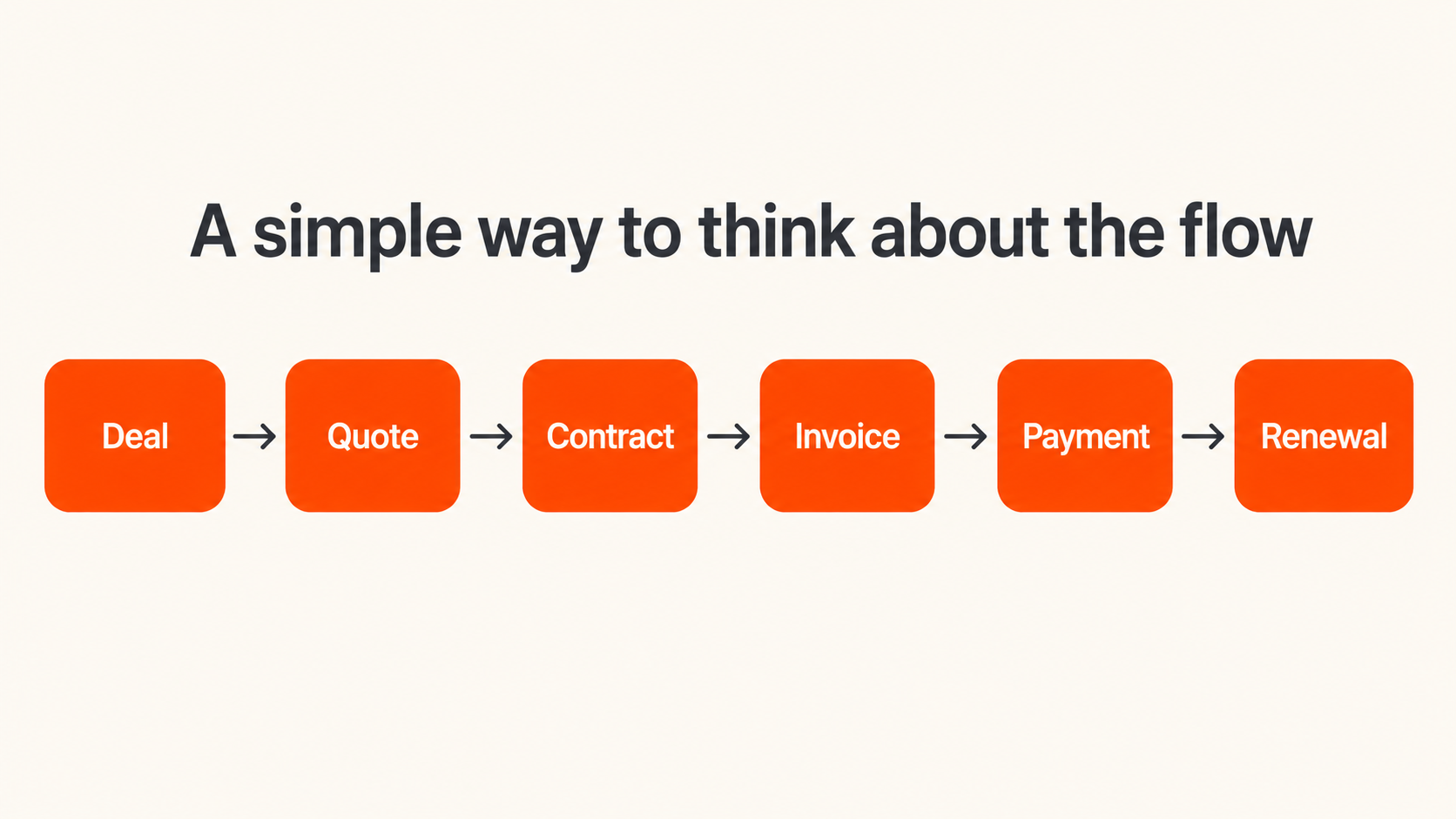
The value of this model is that each stage passes structured data to the next. The quote informs the contract. The contract informs billing. The payment connects back to the customer. The renewal is managed from the agreement already recorded in HubSpot.
The Connected Data Model
The strongest operational benefit of Revenue Hub is the data model behind the process.
In many businesses, revenue data is split across systems. The CRM holds the deal. A document tool holds the proposal. A finance system holds the invoice. A spreadsheet tracks renewals. Email threads explain exceptions.
That structure makes it difficult to understand the full customer relationship.
Revenue Hub brings more of that information into HubSpot’s object model. This allows teams to connect deals, quotes, contracts, invoices, payments and renewals around the same customer record.
That context can help different teams work with fewer handoffs.
Sales can understand what the customer has already bought before discussing an upsell. Customer success can see renewal timing and post-sale changes. Finance can connect invoice and payment activity to the account. RevOps can govern products, pricing and approval processes more consistently. Leadership can report on revenue beyond closed-won deals.
The result is a more reliable view of revenue activity across the customer lifecycle.
The main components of Revenue Hub
Revenue Hub brings several capabilities together. The exact setup depends on subscription level, region, payment provider and implementation approach, but the core components are broadly consistent.
CPQ
CPQ stands for configure, price, quote.
In HubSpot, CPQ helps teams build quotes from products, line items, pricing and templates. It supports a more structured quoting process, especially when teams need consistent pricing, discount approval, buyer acceptance and quote tracking.
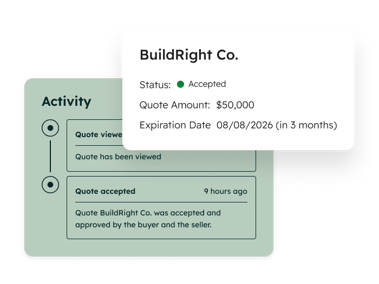 Quote Activity in Revenue Hub
Source: HubSpot
This is useful for businesses where reps currently create quotes manually or rely on spreadsheets to calculate pricing.
A better quoting process helps reduce errors before they move downstream into contracts, invoices and reporting.
Product Library and Pricing
Revenue Hub depends on a clean product and pricing structure.
Products, line items, pricing models, price books, tiered pricing and ramp pricing all affect how quotes are created and how revenue is reported.
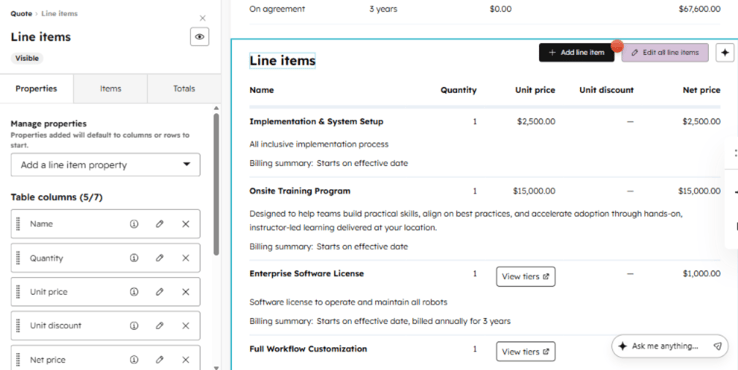 Line Items Property Library in Revenue Hub
Source: HubSpot
This is an important RevOps consideration. If the product library is inconsistent, the quote-to-cash process becomes harder to manage.
Before implementing Revenue Hub, businesses should review what they sell, how it is priced and how it should appear across quotes, contracts, invoices and reports.
Contracts
Contracts are one of the most important parts of Revenue Hub.
A deal records the sales opportunity. A contract records the commercial agreement that needs to be managed after acceptance.
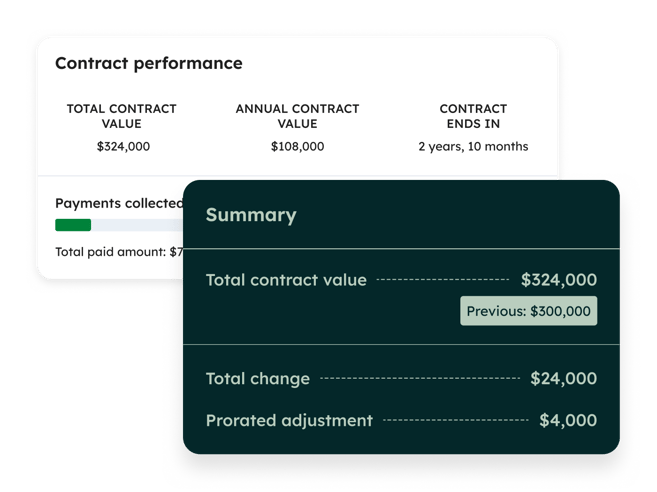 Contracts Overview
Source: HubSpot
The contract can hold information such as start date, end date, renewal date, billing terms, committed revenue and post-sale changes. This gives sales, finance and customer success a shared reference point for the ongoing customer relationship.
For recurring revenue, retainers, subscriptions, service agreements and multi-year contracts, this structure is particularly useful.
Billing and Invoices
Revenue Hub connects accepted commercial terms to billing activity.
This can include invoice creation, billing schedules, payment links and reminders, depending on the setup. The aim is to reduce manual re-entry between sales and finance and give teams clearer visibility into what needs to be billed.
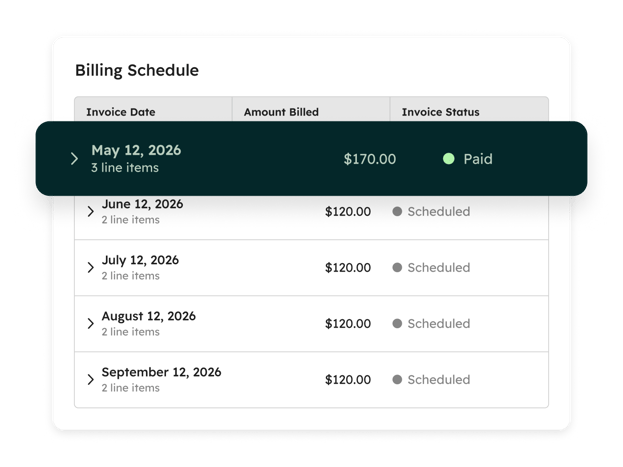 Billing Schedule
Source: HubSpot
For example, instead of finance recreating invoice details from a closed deal or PDF quote, billing can be informed by the quote and contract data already captured in HubSpot.
Payments
Payments bring collection data back into the customer record.
Teams can see whether payment has been made, whether an invoice is overdue and where follow-up may be needed. This helps account owners and finance teams work from the same commercial context.
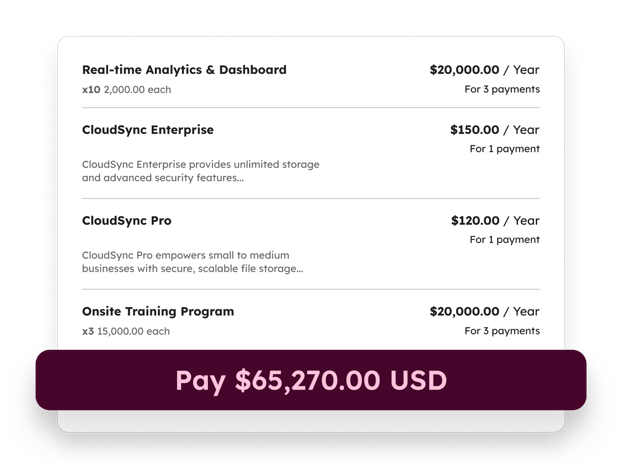 Payment Checkout Summary
Source: HubSpot
It also creates a clearer distinction between closed-won revenue, invoiced revenue and collected revenue.
A deal being closed-won tells you what was sold. Payment data tells you what has actually been collected.
Renewals and changes
Revenue continues to change after the initial sale.
Customers renew, expand, downgrade, amend terms or change billing arrangements. Without a structured record, these updates often end up spread across notes, PDFs, emails or spreadsheets.
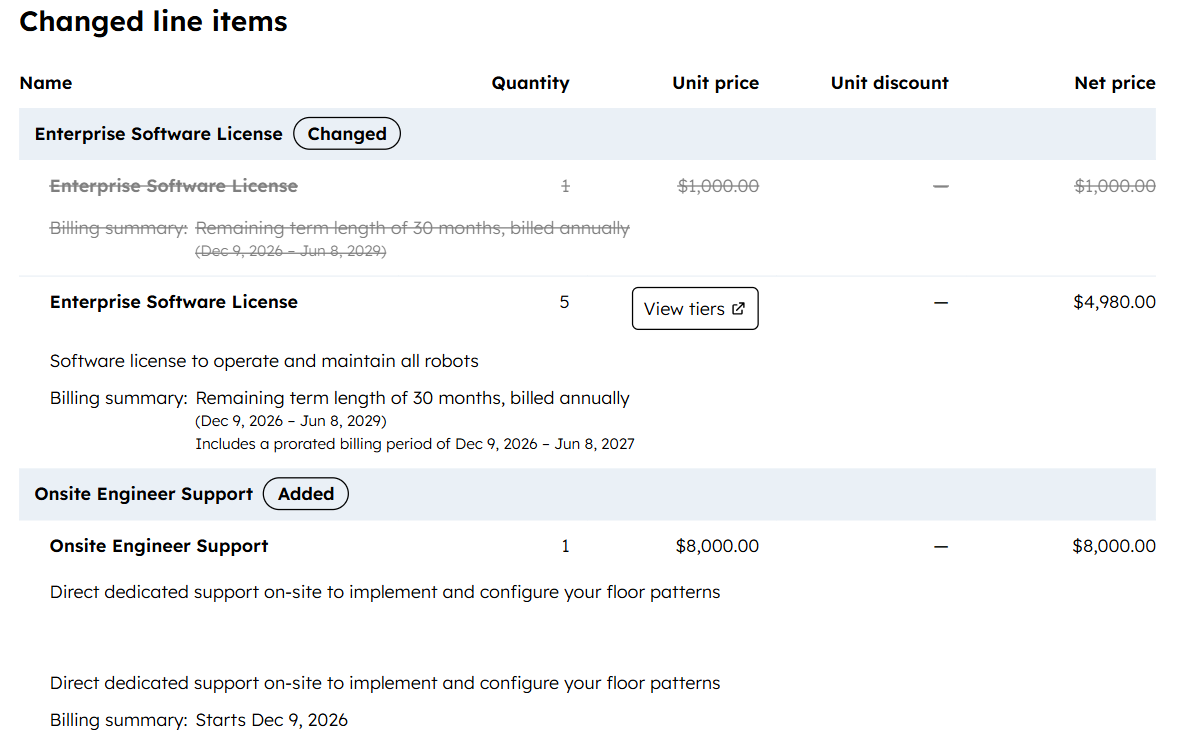
The tool allows you to view and review the extent of the changes made.
Source: HubSpot
Revenue Hub gives teams a clearer way to manage those updates through contracts and related revenue records. This helps teams maintain continuity from the original sale through to renewal and expansion.
Reporting
Revenue reporting becomes more useful when commercial data is connected.
Instead of reporting only on pipeline and closed-won deals, teams can report across more of the revenue lifecycle. This may include recurring revenue, contract value, invoice status, collected payments, receivables, renewals, expansion and retention.
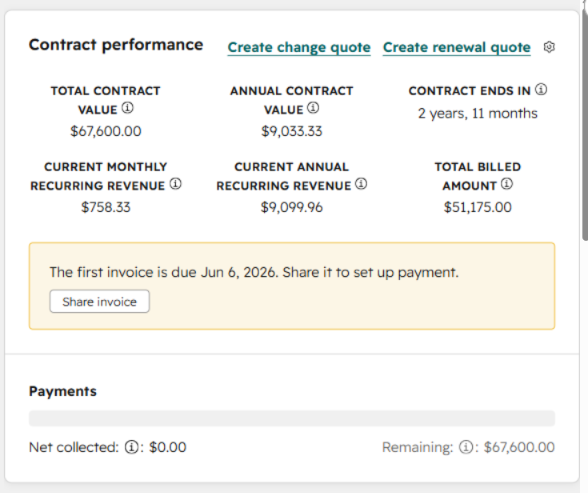 Source: HubSpot
For leadership, this can create a more accurate view of business performance. For RevOps, it creates a stronger foundation for governance and forecasting.
Where AI Fits into Revenue Hub
Revenue Hub also matters because of HubSpot’s broader AI direction.
AI tools need reliable context to be useful. If they can see sales activity but not contract terms, billing status, invoice history or renewal timing, their recommendations will be limited.
By connecting revenue data to the customer record, HubSpot gives AI agents more useful context to work from.
For example, AI can help teams:
-
Draft quote content from deal context
-
Prioritise overdue invoices
-
prepare collection follow-ups
-
Support invoice self-service
-
Identify renewal risks
-
Surface expansion opportunities
-
Reduce repetitive administrative work
The value comes from combining customer context with commercial context. AI becomes more practical when it understands both the relationship and the revenue attached to it.
How Revenue Hub Fits with Finance Systems
Revenue Hub can manage more of the operational revenue process inside HubSpot, while finance systems still play an important role.
For many businesses, accounting platforms such as QuickBooks Online, Xero, NetSuite or other finance systems will remain the financial ledger of record. HubSpot can act as the operational revenue layer where quotes, contracts, billing context, payment activity and customer relationships are managed day to day.
This distinction is useful.
HubSpot can support the workflow around revenue. Finance and ERP systems may still manage formal accounting, tax treatment, reconciliation and statutory reporting.
A strong implementation should define where each system sits, which data belongs where and how information should sync between platforms.
Who Should Pay Attention to Revenue Hub?
Revenue Hub is especially relevant for businesses that have outgrown basic quoting or manual revenue processes.
It is useful for teams that need to:
-
Standardise quote creation and approvals
-
Manage products and pricing more consistently
-
Connect quoting to contracts, billing and payments
-
Manage renewals and amendments inside HubSpot
-
Reduce handoffs between sales, finance and customer success
-
Report on revenue beyond closed-won deals
-
Improve visibility into receivables, renewals and post-sale changes
-
Give AI and teams a fuller view of the customer relationship
It is particularly relevant for recurring revenue businesses, B2B services, SaaS companies, implementation partners, retainers, subscriptions, multi-year contracts and businesses with complex pricing or approval processes.
What to review before adopting Revenue Hub
Revenue Hub works best when the underlying process is clear.
Before adopting it, businesses should review their current quote-to-cash journey and answer these questions:
-
Where are quotes created today?
-
Who approves pricing and discounts?
-
How are products and line items structured?
-
Where are contracts stored?
-
How are invoices created?
-
How are payments collected and tracked?
-
How are renewals managed?
-
Where do amendments or mid-contract changes live?
-
Which reports does leadership use?
-
Which parts of the process still rely on spreadsheets?
-
Which finance systems need to stay connected?
These questions help determine whether Revenue Hub should be implemented as a quoting improvement, a billing and payments project or a broader RevOps transformation.
For many businesses, the main work will be process design. The technology can support the workflow, but the business still needs clear rules for pricing, approvals, billing, ownership and reporting.
The bigger takeaway
Commerce Hub becoming Revenue Hub shows where HubSpot is taking the customer platform.
HubSpot is extending from CRM, sales and service workflows into the commercial lifecycle. Revenue Hub gives teams a way to manage quoting, contracts, billing, payments, renewals and reporting around the customer record.
The practical impact is clearer visibility across the revenue process.
Sales can quote with more structure. Finance can see a cleaner billing context. Customer success can manage renewals with better information.
RevOps can govern the process more consistently. Leadership can report on revenue with more confidence. AI agents can work from richer customer and commercial contexts.
For HubSpot customers, the opportunity is to bring more of the quote-to-cash journey into the same place where customer relationships are already managed.
Thank you for reading.