
How to balance a sophisticated website experience with simpler content management, using HubSpot's native tools, HubDB and custom development.
A well-designed website should deliver a great experience for visitors. But what about the people responsible for managing it?
At Cat Media, we've come across HubSpot websites where publishing a simple blog post involves creating a website page, updating a HubDB table, assigning categories, matching URLs and manually maintaining author references. The website itself might look fantastic.
Visitors can browse resources, filter content and navigate between pages with ease. Behind the scenes, however, the marketing team is spending considerably more time managing content than necessary. It's a common challenge in website development: creating a sophisticated front-end experience without giving enough consideration to the day-to-day experience of content editors.
A recent announcement from HubSpot provides a timely opportunity to explore this further.
HubSpot's case studies migration raises an interesting question
HubSpot has announced that its standalone Case Studies tool will be retired on 12 December 2026, with existing case studies automatically migrated to native blog posts. According to HubSpot's official documentation, published case studies will retain their original URLs, listing pages will become blog listing pages, and industry classifications will be converted into blog tags.
Following the announcement, a discussion emerged in the HubSpot Community about how businesses could maintain dedicated case studies libraries with custom layouts and filtering capabilities. One of the solutions suggested was rebuilding the case studies using HubDB. It's a perfectly valid technical option, depending on the requirements. HubDB can power dynamic pages and support structured content with multiple attributes. But it also raises a question worth exploring: If HubSpot is moving case studies into its native blogging functionality, should we first explore what that functionality can achieve before introducing a separate content-management system?
For some businesses, a dedicated blog with custom listing templates and filters may deliver the required experience while retaining a straightforward publishing process. For others, a structured database may be more appropriate. Understanding the difference is an important part of choosing the right website architecture.
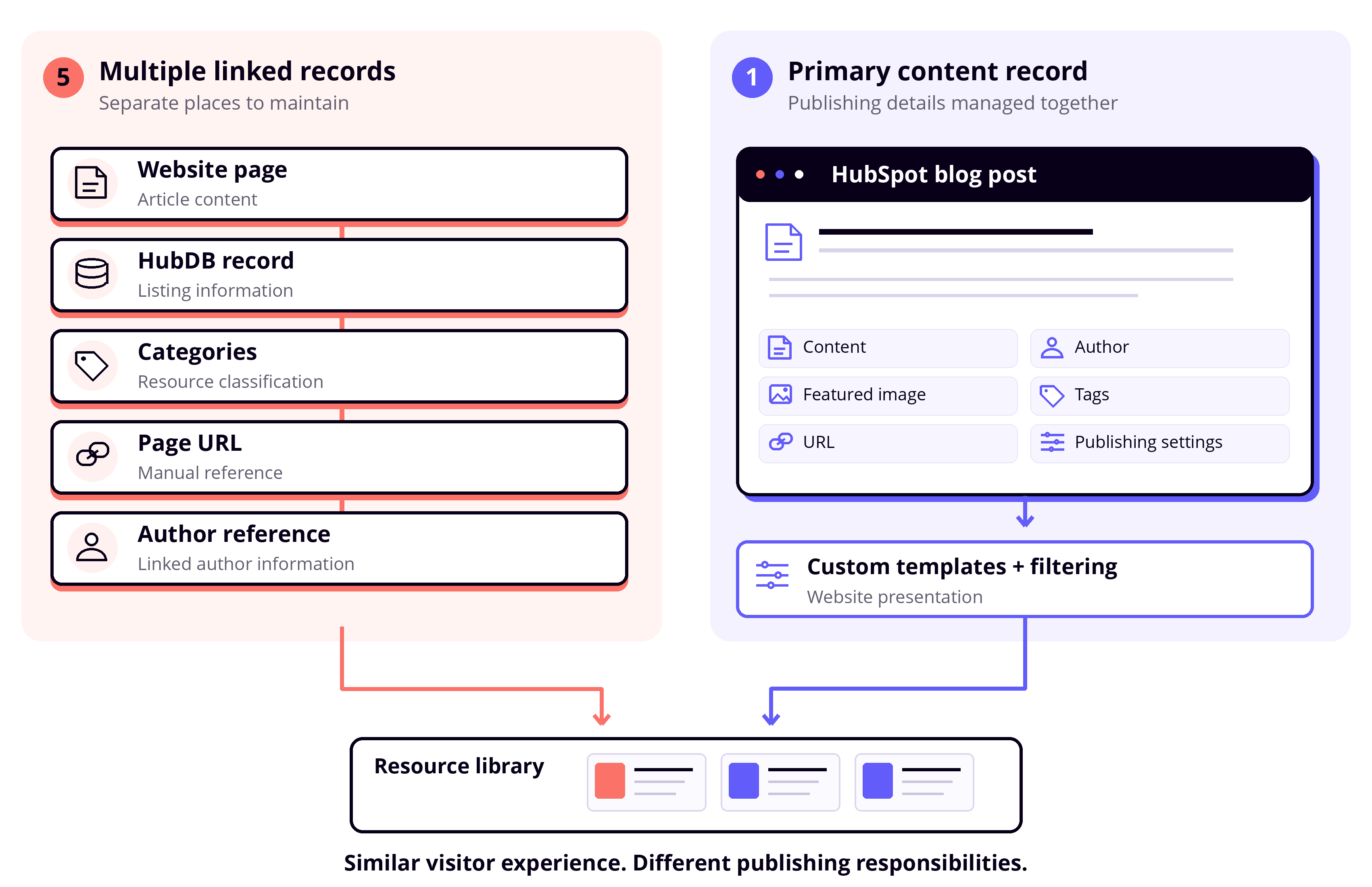
When content management becomes unnecessarily complicated
Let's consider a scenario we've encountered in different HubSpot website implementations. A business has a resource library containing articles, guides, case studies and other materials. Visitors can filter the resources by topic, audience and content type. To support this functionality, the website has been developed using HubDB tables that store information about each resource. When a marketer wants to publish a new article, the process might involve creating a website page, adding a corresponding HubDB record, assigning categories, entering the page URL and linking the appropriate author.
In some implementations, author information is stored in another table, requiring an additional manual reference. Each of these activities seems relatively straightforward on its own.
But consider what happens when the business publishes several articles every month, updates existing resources or introduces new categories. The marketing team is now responsible for maintaining multiple records for what visitors experience as a single piece of content. A URL change might require an update in HubDB. An incorrect reference could affect how an author appears on the page. A missing category could prevent a resource from appearing in the expected filtered results.
These dependencies introduce more opportunities for errors and make routine publishing tasks increasingly time-consuming. The architecture may be delivering exactly what was requested from a visitor's perspective, but the operational cost deserves attention too.
Content management and content presentation are different requirements
One of the most useful principles in HubSpot website development is separating how content is managed from how it is presented to visitors.
For example, a resource library might allow visitors to filter content across three dimensions:
- Topic: Marketing, Sales, Operations
- Audience: Executives, Managers, Practitioners
- Content Type: Articles, Guides, Case Studies
The instinct might be to create a HubDB table with separate fields for each dimension. However, a native HubSpot blog can also support this experience through custom development. HubSpot's blog categorisation is tag-based. Although those tags are not organised into separate built-in taxonomy fields, developers can create custom modules that interpret groups of tags as different visitor-facing categories. A post tagged with "CRM", "Executives" and "Guide", for instance, could appear under the corresponding Topic, Audience and Content Type filters.
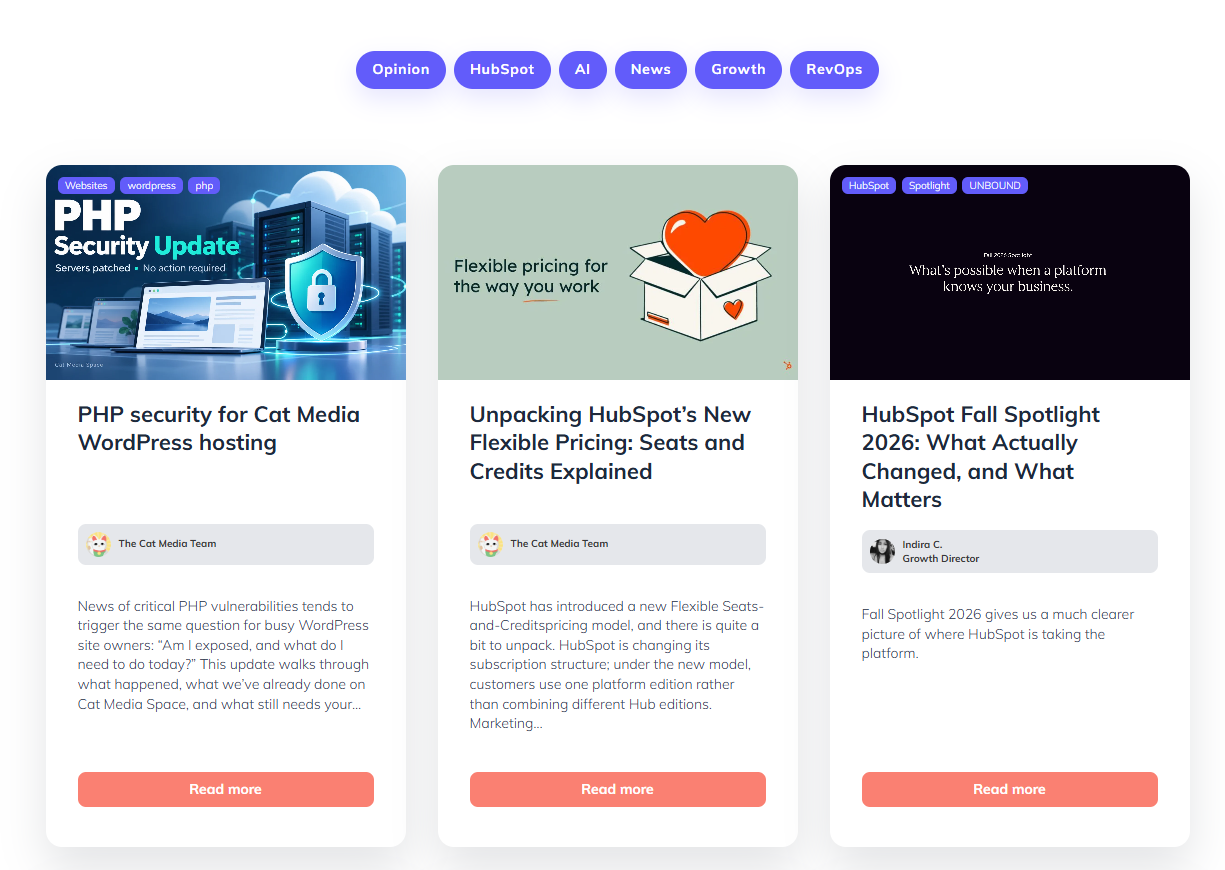
A screenshot of CatMedia's Resources Page, separating blog posts with tags for easier search.
Using HubSpot's CMS development capabilities, such as HubL or GraphQL where appropriate, developers can retrieve blog content and apply the logic required to organise and filter it.
The result? Visitors see a sophisticated resource library with the categorisation they need. Meanwhile, marketers continue creating and managing articles through the native HubSpot blog editor, including the content, author, featured image, tags, SEO settings and publication scheduling.
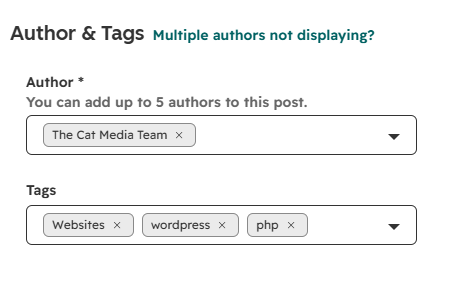
Manage tags easily to make sure your blog post reaches the right audience.
The filtering logic requires thoughtful development and a well-maintained taxonomy. But that complexity can be managed within the website architecture rather than passed on to marketers as repetitive administrative work. A sophisticated visitor experience doesn't have to mean a complicated publishing process.
Where HubDB really adds value
This is an important distinction because HubDB is an extremely useful tool when applied to the right requirements. We've used it successfully in projects where structured data is central to the website experience.
For example, in one implementation, we developed a dynamic portfolio experience using a combination of Airtable, HubDB and React. The data originates in Airtable, where it is managed as the source of truth.
An integration automatically feeds that information into HubDB, which serves as the structured data layer for the website. React is then used to render dynamic cards and other interactive elements, while individual portfolio pages are managed as HubSpot landing pages.
In this architecture, HubDB is doing exactly what we need it to do: storing structured information that can be retrieved and presented dynamically. The marketing team doesn't need to manually create or maintain HubDB records to keep the portfolio updated. The integration handles the data synchronisation, and the website handles the presentation.
That's a very different use case from asking marketers to duplicate blog content or maintain manual relationships between website pages and database records.
HubDB can also be a strong choice for product catalogues, location directories, structured listings and other data-driven website experiences.
The important consideration is understanding whether HubDB is acting as a useful data layer or introducing an additional content-management responsibility. Both approaches can be technically sound, but they have very different operational implications.
Revisiting the case studies example
Let's return to HubSpot's case studies migration. Imagine a business needs a dedicated case studies library with a grid of cards, filters by industry and product, and individual pages with a consistent design.There are several architectural approaches worth evaluating.
Option 1: Native HubSpot blog with customised templates
Case studies can be managed as blog posts, with custom templates controlling their appearance and listing pages. Tags can support categorisation, while custom modules provide additional presentation and filtering options. This is particularly appealing when case studies are primarily editorial content and the marketing team needs an efficient publishing process.
Option 2: HubDB-powered dynamic content
If the case studies rely on extensive structured attributes, complex data relationships or an external data source, HubDB may offer a more suitable model. Dynamic templates can then generate consistent listing and detail pages from structured records.
Option 3: A combination of native content and custom functionality
Sometimes the right solution combines different HubSpot capabilities.
For example, blog posts can remain the primary content records while custom modules provide a more advanced browsing experience.
The right decision depends on the content structure, filtering requirements, existing URLs, integrations and the teams responsible for maintaining the website. For organisations affected by the case studies migration, it's also worth reviewing what HubSpot will preserve automatically before committing to rebuilding the content elsewhere.
The objective is to achieve the required functionality with an architecture that remains practical to maintain.
The same principle applies to custom modules
Content architecture goes beyond deciding between native blog posts and HubDB. We've also encountered websites developed with large, rigid custom modules that contain several predefined sections. These can produce excellent visual results, but they may limit what marketers can change without developer assistance.
A relatively simple request, such as adding a new section or rearranging content, can become another development task. HubSpot's visual editing experience and drag-and-drop capabilities offer opportunities to make website management more flexible.
With smaller, reusable modules and a consistent design system, developers can provide marketers with the components they need to build and update pages independently. Typography, spacing and other common styles can remain centrally controlled, preserving the overall design.
This approach requires thoughtful development upfront, but it can significantly improve the website's long-term usability. The goal is to give content teams the flexibility they need while maintaining the quality and consistency of the visitor experience.
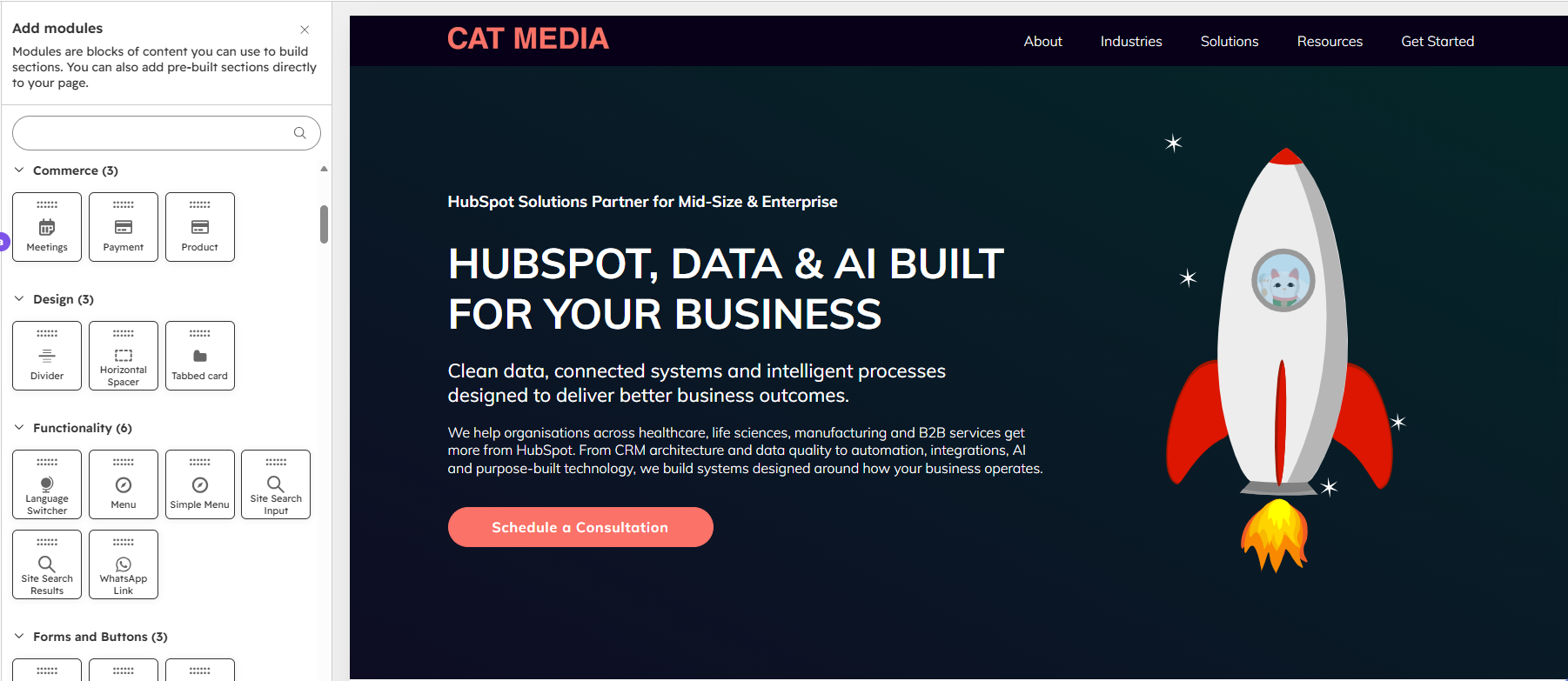
Custom Modules allow your content to be ordered in any way you want.
Consider the long-term cost of your architecture
When planning a website, development effort and launch timelines naturally receive considerable attention. However, the ongoing cost of managing the website is just as important. Consider a publishing workflow that requires several additional manual steps for every article. Those steps might seem insignificant during implementation.
Over time, they accumulate across new content, updates, corrections and routine maintenance. Then there are the less visible costs: training new colleagues, troubleshooting inconsistent records, checking references and involving developers in activities that marketing teams could otherwise manage independently.
A website architecture should therefore be evaluated on more than its initial development cost or technical capabilities. It should also be assessed against the time and effort required to operate it. Sometimes investing a little more in reusable components, automation or better content architecture during development can substantially reduce the ongoing workload.
Five questions to ask before choosing your HubSpot content architecture
Whether you're planning a new HubSpot website, considering a redesign or reviewing an existing implementation, these questions can help guide the decision.
1. Can the requirement be met using native HubSpot functionality?
Explore what blogs, tags, templates, drag-and-drop editing and existing CMS capabilities can achieve before introducing additional data structures.
2. Does the content genuinely require a structured database?
If you're managing complex datasets, externally sourced information or data-driven content relationships, HubDB may be an excellent choice. For editorial content, native publishing tools may be more practical.
3. How many places will someone need to update to publish or edit content?
Consider the complete workflow, from creating an article to assigning categories, managing authors, updating URLs and publishing.
4. Can the visitor experience be separated from the editing experience?
Custom development can provide sophisticated filtering, navigation and presentation while allowing marketers to work within familiar native tools.
5. How will the solution scale as content and business requirements evolve?
Think about taxonomy governance, automation, integrations, training, maintenance and future development requirements. The answers will help determine which combination of native functionality, HubDB and custom development offers the best balance.
Building HubSpot websites for the people who use them
A great HubSpot website should work equally well for visitors and the people responsible for managing it. That requires thinking beyond the initial design and considering how content will be created, maintained and expanded over time.
HubSpot offers a broad range of capabilities, from native blogging and visual editing to HubDB, GraphQL and custom modules. Each has a role to play. The key is understanding which tools are best suited to the requirement and designing an architecture that makes the most of their strengths. At Cat Media, we approach HubSpot website development and optimisation with this balance in mind. We want businesses to benefit from sophisticated digital experiences while giving their marketing teams the autonomy to manage them efficiently.
Because ultimately, the best content architecture is the one that delivers the experience your visitors need while making life easier for the people behind the website.
Is your HubSpot website harder to manage than it should be?
If your marketing team relies on developers for routine content updates, or publishing a simple article involves multiple systems and manual steps, it may be worth reviewing your content architecture.
Let's talk about making your HubSpot website easier to manage.